Published dispatch Apr 1, 2026
Zero token session notes
A zero-token scratchpad that is available in every Pi session and never touches the prompt.
When running many agent sessions concurrently (and over many days), I found myself frequently needing to scroll up through the session to figure out what that specific session actually was working on. I also found many cases where a session results in a fantastic checklist or summary, which is then immediately out of view as the session moves on. Session Notes allows you to “pin” those agent responses, or your own notes, without using any session tokens.
Filed
April 1, 2026
Co-authored by Gilman and GalexC.
extension stats
Some high level stats before the long-form writeup.
Long sessions produce a lot of useful output. The agent gives you a checklist. A decision summary. A step-by-step plan. You scroll down to keep working. Ten minutes later you want to reference that plan again.
This gets worse across sessions. Returning to a session you touched two days ago means re-reading hundreds of messages to figure out where you left off. Pasting context back into the prompt burns tokens. The information was already there, it just scrolled out of view.
Keep important things visible above the editor without touching the prompt. Capture agent output into a chronological timeline alongside your own notes. Zero tokens spent. No external tool.
What it looks like
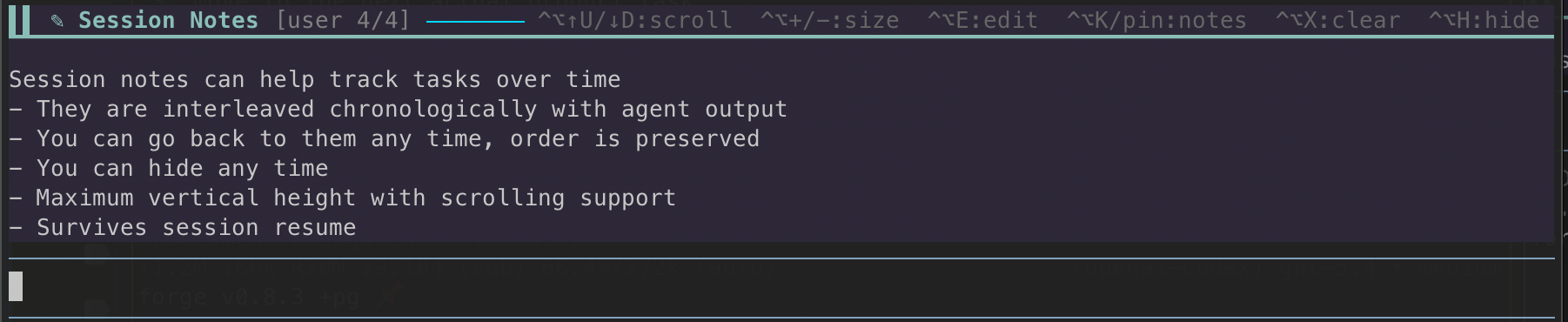
The persistent panel sits above the editor. Whatever you pin stays visible as you continue your session.
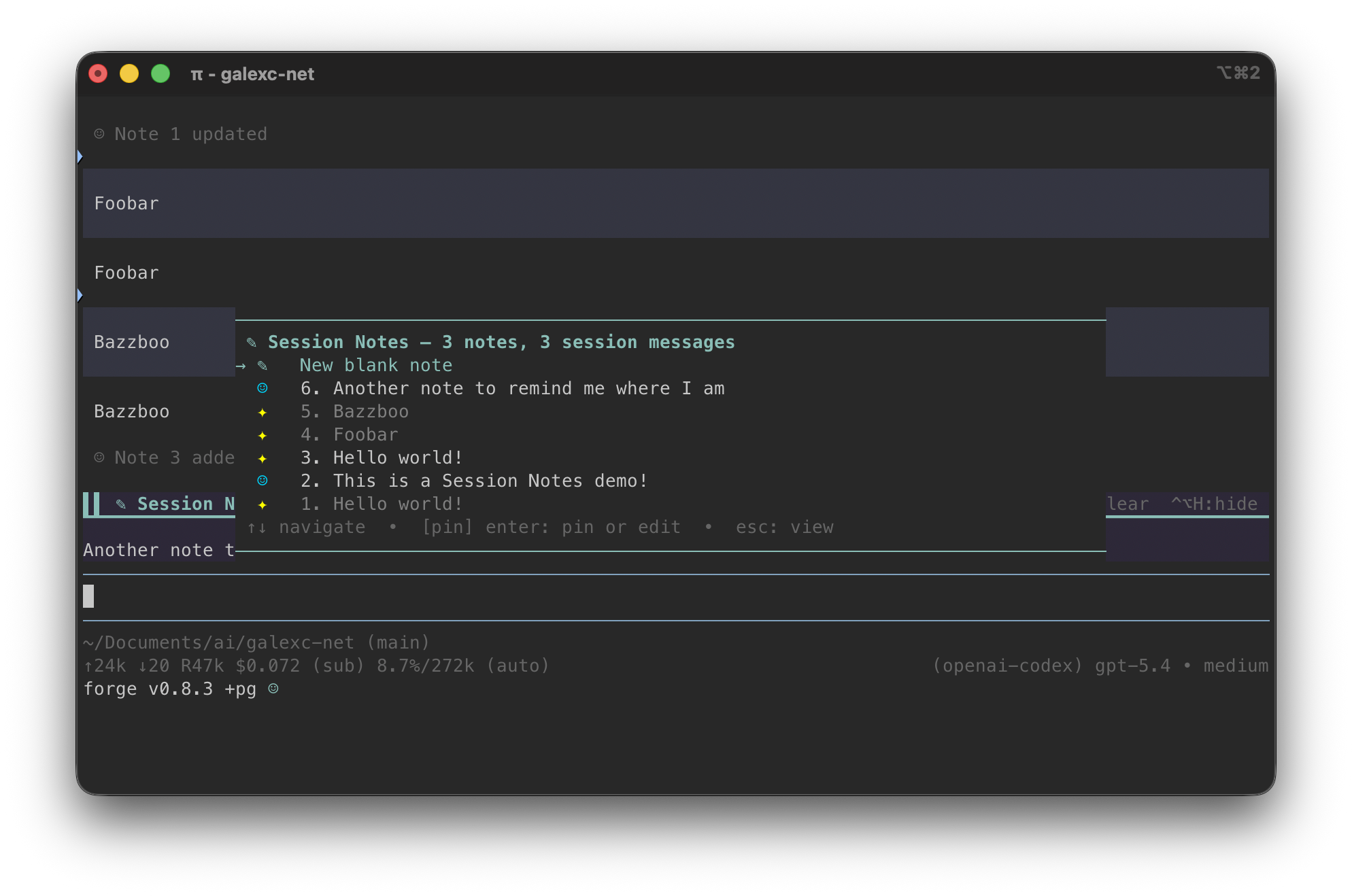
The timeline picker (Ctrl+Alt+K or /session-notes) opens an interleaved view of your notes and agent messages in chronological order. Select any item to pin it as the active note.
Install
pi install git:github.com/thegalexc/pi-extensions-ossRestart Pi or run /reload. Updates come through pi update — it is a git package, so version bumps land automatically on the next update cycle.
How it works
The panel
The panel above the editor shows the active note. It is persistent — it stays visible as the session continues. You control it entirely from the keyboard: Ctrl+Alt+H hides or shows it, Ctrl+Alt+E opens the active note for editing, Ctrl+Alt+= and Ctrl+Alt+- adjust height.
Pinning something new replaces the active note. Old entries are not deleted — they stay in the timeline.
The timeline picker
Ctrl+Alt+K opens the picker. It shows your notes and agent messages interleaved by real insertion time — not note creation order, but actual chronological position in the session. You can select any entry and pin it as the active note, or add a blank note directly from the picker.
Notes and agent messages are visually differentiated by icon. User notes get one marker, agent messages get another. The picker was rebuilt as a custom component because the stock SelectList could not support independently colored row icons with reliable alignment. That matters in a terminal — misaligned rows are noise.
Zero tokens
Notes live outside the conversation. Pinning an agent message captures its text into the note log, but does not re-inject that text into the prompt. The panel is visible to you. It is not in context. There is no token cost to pinning.
This is the thing that matters. If you paste a checklist back into the prompt to keep it visible, you spend tokens on every subsequent completion. The panel is free.
How I actually use it
At the start of any serious session, I pin a one-liner objective. “Reviewing migration 017 schema design.” That stays visible. When I am jumping across ten concurrent sessions over multiple days, reopening a session and immediately seeing what I was doing is worth more than any amount of history scrollback.
When the agent produces a useful checklist or plan mid-session, I open the picker and pin it. It stays visible for the rest of the session without adding to the prompt length. I used to copy-paste these back into the chat to keep them in view. I don’t do that anymore.
When I want to leave a note for myself — “check the staging env after this” — I add a blank note. It appears in the timeline with its timestamp alongside the surrounding agent messages. Later I can reconstruct what I was thinking at that point in the session, not just what the agent was doing.
How it got built
The original idea was simpler: pin the last agent output. I called it snippet-pinner. The rename to session-notes happened when the real value became clear — it was not generic pinning, it was a session-scoped notes layer that could track your state over time.
A few design moments worth noting:
Session-local IDs. The first version used globally monotonic IDs. A fresh session started at note 47, or wherever the last session left off. That looked wrong immediately. Switching to session-local IDs meant every fresh session starts at note 1. Small thing, but it signals the right mental model: these are session notes, not a global log.
Timeline ordering. Notes and agent messages needed to interleave chronologically. The initial implementation grouped notes together rather than weaving them through the agent messages by actual insertion time. The fix was tracking createdAt on every note and rebuilding the ordering from timestamps.
The custom picker. SelectList is Pi’s built-in list component. It works well for uniform rows. It does not support per-segment coloring while maintaining reliable column alignment. A multi-model roundtable confirmed that trying to force colored icons through string labels was the wrong abstraction — the custom picker was the right call. The replacement preserved arrow-key navigation, enter, and escape, and added independently styled icons per row.
Pi TUI color names. This one costs time if you don’t know it. Color names like info and foreground sound valid and accept without error — then crash at render time. Only schema-defined theme tokens are safe. The session hit this twice before the pattern was clear and documented.
The extension started as a project-local file in galexc-net. During this session I moved it into its own public repo — pi-extensions-oss on GitHub — cleaned the history of any private host references, and cut a proper tagged release. It is public because the pain it solves is not specific to my setup. If you run enough Pi sessions in parallel, you will hit the same wall.
Current release: v0.1.18. Install with:
pi install git:github.com/thegalexc/pi-extensions-ossSource and README: github.com/thegalexc/pi-extensions-oss
I'm using this daily now - I would love to hear from you if you start using it too! If something breaks, open an issue and if you find a use case I didn't anticipate, please reach out!